Everything in my AI toolkit right now
Plus two AI projects blew my mind this week...

Remy Gaskell
April 04, 2026

Howdy yall,
I touched down in Miami yesterday. Newsletter is a day late - someone fire this guy. oh wait.
Also been playing around with 2 cool AI projects this week; Paperclip & Hermes agent.
Let’s get into it :)
📌 TL;DR
Hermes Agent → The best open-source alternative to OpenClaw right now. Self-hosted, learns from every conversation, connects to Telegram/WhatsApp/Slack/Email, and actually works out of the box.
Paperclip → An open-source management layer for running multiple AI agents from one dashboard. Cool concept, still early. I'm testing it but the agents keep breaking. Give me a week.
Also this week → Google dropped Gemma 4 (best open-weight models, fully commercial), Anthropic accidentally leaked Claude Code's entire source code, and Google launched budget AI video generation.
Builder's notes → A full lay of the land on my current tool stack. What I'm using for content creation, automation, voice to text, meetings, note-taking, and my daily workhorse.
Hermes Agent
you know OpenClaw. The problem is, it breaks. A lot. Setup takes days of debugging, it stops working all the f* cking time, and the memory sucks ass. Anyone thats actually getting good results from it have heavily modified it with things like supermemory.
Hermes Agent), built by Nous Research, fixes basically all of that.
Same concept. A self-hosted agent that lives on your server 24/7, but this one actually works straight away. Setup takes 10-15 minutes. It connects to Telegram, WhatsApp, Discord, Slack, Signal, and Email from a single install. And the bit that really sets it apart: it learns and gets better the longer you use it.
When Hermes completes a complex task, it turns that experience into a permanent "skill" it can reference next time. Separately, it keeps a local database of every conversation with a search engine on top. When you start a new chat, it searches its own history for anything relevant. Past projects, decisions you've made, how you like things done. The more you use it, the more it has to draw from.
Model-agnostic too. Run it on Claude, GPT, local models (like the new Gemma 4), whatever you want. Completely free, MIT-licensed, and you can run it on a $5 VPS.
I set one up the other day to test it out. Setup was genuinely easy. It hasn't broken once. And they even have a single command that migrates your entire OpenClaw setup over. Not sure yet if Hermes will earn a permanent spot in my workflow, but so far I'm impressed.
If you want to use an open-source agent harness like OpenClaw, I think Hermes is the best on the market.
Paperclip
Paperclip is an open-source app for managing multiple AI agents. 44k GitHub stars in under a month, and the messaging is all about building "zero-human companies." You define a goal, it hires a team of AI agents, and your business runs itself.
Yeah, no. Anyone who's actually built with AI agents knows that's not how it works.
What Paperclip actually does well is organize your agents. If you're running multiple agents across your business, you've probably got a mess of terminal tabs, no shared context, and no idea what each one is doing. Paperclip gives them a clean workspace and you can see what every agent is doing from one dashboard.
You can assign tasks to your agents, and it also has a heartbeat system like OpenCLaw. Each agent wakes up on a schedule, checks its task queue, does the work, logs progress, and goes dormant. If one agent needs something outside its scope, it passes it to the right agent automatically.
It's bring your own bot. You can plug in agents from Claude Code, OpenClaw, Hermes, Codex, Cursor, anything - and even have Hermes agents working alongside Claude Code agents.
I've been testing it. Got a CEO, CFO, marketing lead, and product lead running on Claude Code. I really like the interface. But honestly, the agents have broken a lot. Basic tasks that work fine in Claude Code aren't really working when routed through Paperclip. I also set it up on my laptop so the heartbeats don't fire when it's shut. I'll probably move it to my Mac Mini.
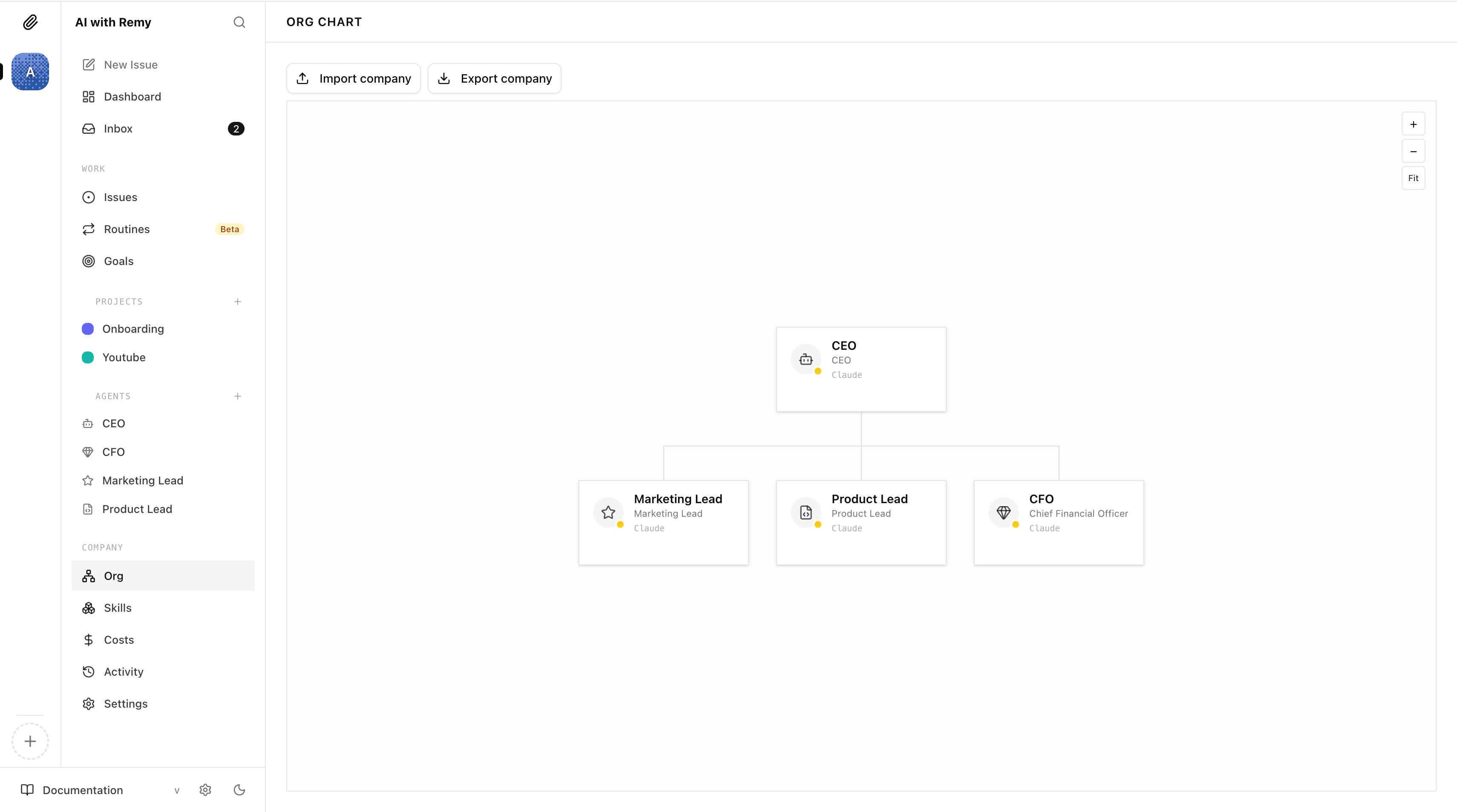
Give me till next week to work this out because I actually really do like the concept. It's more like a management layer on top of Claude Code.
Rather than loading my marketing team folder in VS Code, that just becomes my marketing team agent in Paperclip. Similar concept, but with a cleaner interface.
Also this week...
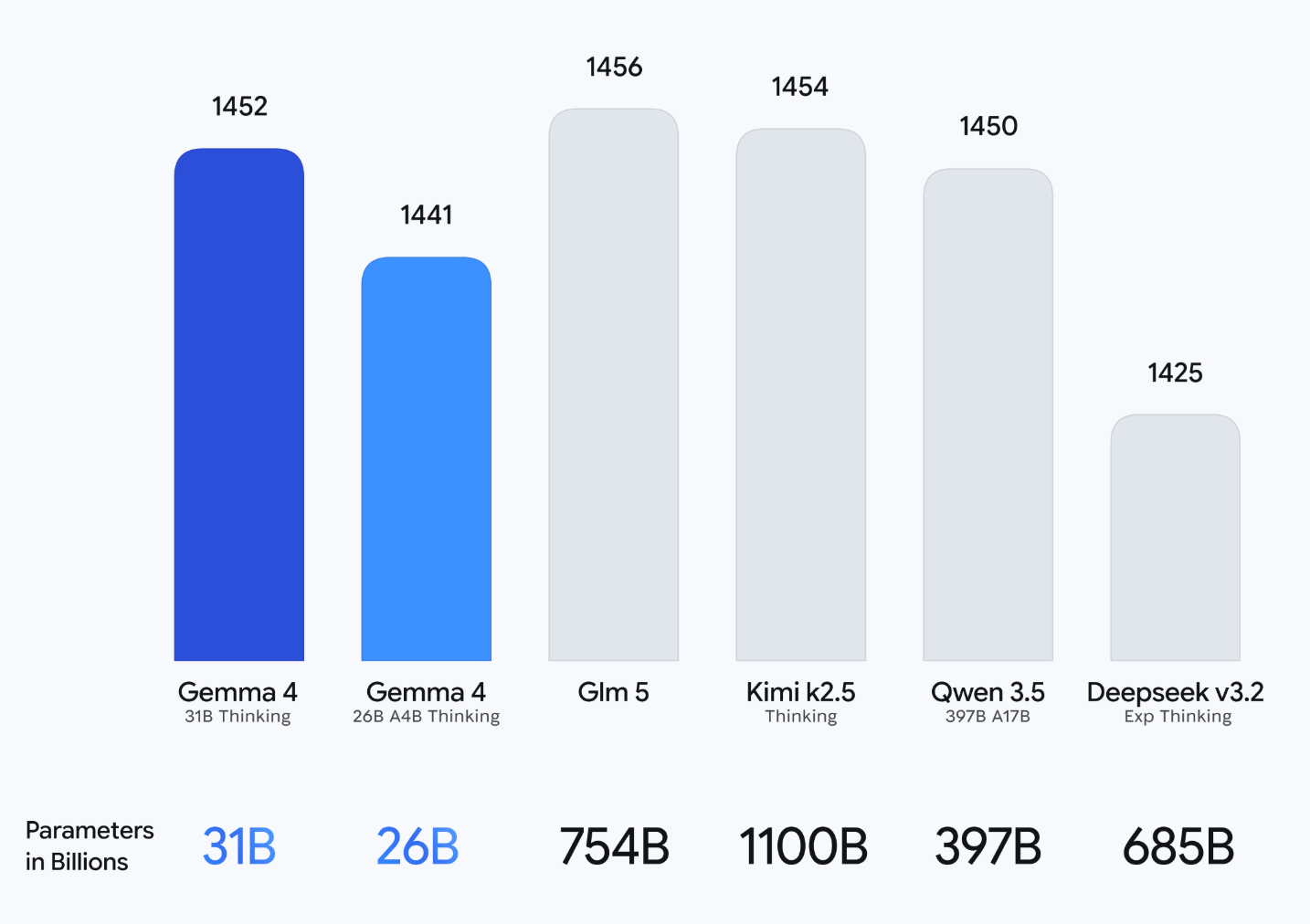
Google dropped Gemma 4 → Their most capable open-weight models, all under Apache 2.0, which means zero restrictions on commercial use. You can build products with them, sell them, modify them, and Google can't pull the rug. If you want to run AI locally for free, this is the best option right now.
Anthropic's Claude Code source code leaked → Someone at Anthropic forgot to exclude a source map file from an npm package update, and 512,000 lines of unobfuscated TypeScript shipped to the public. The entire architecture of Claude Code, exposed. Open-source clones appeared within hours.
Does this affect you as a user? Not really. Anthropic patched it the same day. What got leaked was the harness (how Claude Code orchestrates tools, manages sessions, handles permissions), not Claude itself.
Google launched Veo 3.1 Lite → Budget AI video generation at roughly half the cost of full Veo 3.1. The trade-off: max 1080p (no 4K), 8 second clips with no extension, and fewer editing controls.
💡 Builder’s notes
This space moves fast. I just wanted to give you guys a lay of the land. What I'm using in my core stack right now.
AI content creation
I use Higgsfield for all my AI image and video generation. It gives you access to all the top models under one subscription instead of juggling separate accounts.
For images, Nano Banana Pro and Nano Banana 2 are the strongest options right now. I've also connected NanoBanana to Claude Code as an MCP so I can generate images directly from my terminal for certain workflows.
For video, it depends on the style. Sora 2 is really good for UGC-looking content (phone, influencer style). Google Veo 3 is better for cinematic stuff. And Kling 3.0 is also genuinely good.
Voice to text
I'm using Resonant. It's free, fast, and runs entirely on your laptop so your dictations never leave your machine. The trade-off is it transcribes exactly what you say. So if you say "make it blue, actually no, purple" you get the full sentence. Whispr Flow and Monologue are smarter about understanding intent and will just give you "make it purple."
Automation
n8n and Claude Code. n8n handles rigid backend processes. Like when someone buys a product on Stripe, send them the email with the product. or onboarding flows. That kind of thing.
Most of my workflows are just Claude skills that I either run manually or set up as scheduled tasks. My morning briefing is a good example. Claude goes through all 3 of my email inboxes, 3 calendars, checks my goals and priorities, plans out my day, and offers insights I wouldn't have spotted myself.
Newsletter
Beehiiv. Probably the best newsletter platform on the market, built by a great team. If you're looking to start your own newsletter, use my link to get 20% off for 3 months, and I get a little kickback too :)
Saving stuff from across the internet
My Mind. It's like a bookmarks bar for the entire internet. I save X posts, Instagram reels, YouTube videos, websites, text snippets, all in one place. Works on my phone too. And you can use AI search to find things later. If you've ever lost a link you know you saved somewhere, this fixes that.
The boring essentials
Google Workspace. Calendar, email, Drive, Meets. It comes with the Gemini subscription too which is neat. One thing I've learned from building out projects for clients: the Google suite is significantly easier to integrate with your AI agents than Microsoft. The Microsoft suite is a complete pain in the ass to automate.
My daily workhorse
Claude Code inside VS Code. I use it for everything. most of the time for non-coding work; Marketing, research, copywriting, emails, daily tasks, all happen in Claude Code.
I've tried most agents on the market. I was deep into OpenClaw for months because the scheduled tasks and always-on nature was so powerful. But Claude Code have now shipped all the same features plus the Telegram integration, so I've consolidated back.
It also comes with Anthropic's models. Opus 4.6 is the best AI model I've ever used and it's widely agreed that it's the best on the market right now. Claude also ships the best features first. They created skills. They created MCP. They were the first to build any of these modern AI agents before Codex, Antigravity, and the rest followed.
As of this week, I've also set up Hermes Agent (covered above). If you want something open-source that you can run your own models on with scheduled tasks out of the box, it beats OpenClaw for me.
Two other options I don't use daily but see a lot of value in: Manus and Claude Cowork. They're on par with each other and serve that audience of non-technical founders who are intimidated by Claude Code but want to get started with AI agents. About 80-90% of Claude Code's functionality, but much more user-friendly. They're only going to get better.
Second brain
Obsidian. My entire setup lives here. A projects folder with everything I'm working on. A notes folder for brain dumps. Daily logs where Claude creates a new page each morning with my schedule, tasks, and an introspection section where it looks at my last couple of weeks and flags work I'm avoiding or priorities I've got wrong.
Then I've got an areas folder broken down by brand (AI with Remy, clients, my ecom brand), each loaded with context files: about me, voice DNA, positioning, ideal customer profile, brand guidelines.
Plus a content folder where I plan newsletters, YouTube videos, and reels. It gives Claude a database of everything I've ever put out.
I still use Notion for a couple of things. Lead magnets mostly. Anytime I want to create a guide to share, I make it as a Notion page, make it public, and share the link.
I've also still got my CRM and contacts database in there. But having things split isn't ideal. I was really loyal to Notion and didn't love moving away. But Obsidian makes it so much easier for Claude Code to access your second brain.
And I find with Notion it's too easy to get caught up perfecting your setup. Obsidian is more raw, and simpler setups are better.
Meeting notes
I use Granola. It's discreet. It doesn't join your meetings or show up as a bot. It just records the audio, transcribes it, and gives you clean meeting notes. The entire app is just markdown files, so you can connect it via MCP to your agent and give Claude full access to every meeting you've ever had for context. It's also got a native integration with Claude in the Desktop app for Cowork.
The only downside is it doesn't record the video, which is actually a pain in the ass for calls you want fully recorded. For those, I either just hit record in whatever meeting software I'm using, or Fathom is a free meeting notes option that records video too. If recording is a necessity for you, that might be the go.
🥣 Brain food
/buddy in Claude Code → Anthropic shipped a virtual pet companion that lives in your terminal. 18 species, rarity tiers, shiny variants. Type
/buddyto meet yours.5 AI advisors argue about your question → Ole Lehmann built a Claude skill that spawns 5 AI advisors, forces them to debate your question, anonymously review each other's work, and hand you a verdict.
Paperclip: Hire AI Agents Like Employees (Live Demo) → Greg Isenberg interviews Dotta, the creator of Paperclip, and they build an entire AI company from scratch live. Good companion piece if the Paperclip section above caught your eye.
F*ck i hate putting out late newsletters, but I hope you guys enjoyed.
Hermes is awesome. Paperclip is cool. Ill give you an update on how I go with them next week.
Enjoy your weekend,
